
Delete Your Account
We believe you should always have full control over your personal data. Follow the instructions below to permanently remove your EVAR account and associated information.
Method 1: Delete via the EVAR Mobile App
Instant self-service deletion directly inside your EVAR app (recommended).
Launch the EVAR App
Open the EVAR mobile app on your Android or iOS device and ensure you are logged into the account you want to delete.
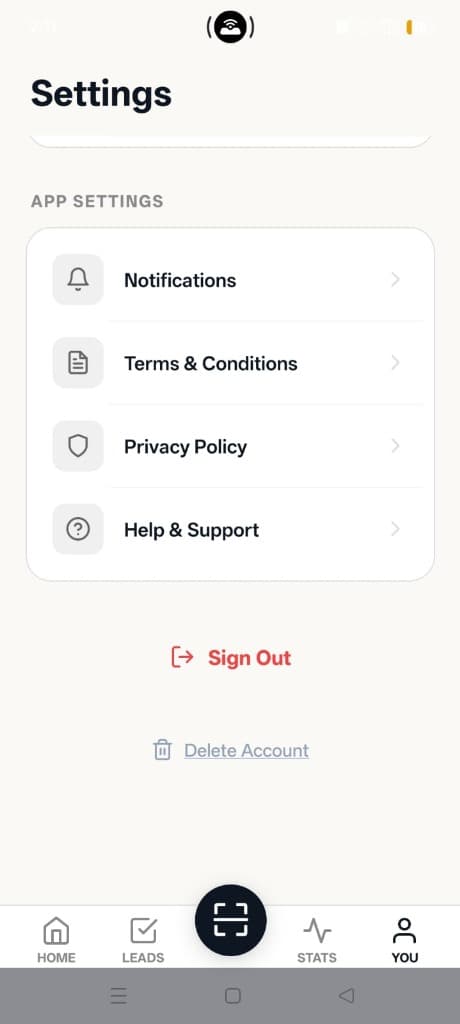
Go to Settings (the "YOU" tab)
Tap the YOU tab located in the bottom navigation bar to view your account profile and settings.
Select "Delete Account"
Scroll down to the bottom of the Settings page (just below the "Sign Out" button) and tap the Delete Account button with the trash icon.
Confirm Permanent Deletion
Review the confirmation modal detailing the permanent removal of your data and tap Confirm. Your session will immediately terminate and your data will be queued for permanent purging.
Method 2: Request Deletion via Email
If you uninstalled the app or cannot sign in, our support team can manually verify and delete your account.
Required details: Please send the email from the address registered with your EVAR account (or specify your registered mobile number). We will verify account ownership before permanently purging your data within 48 business hours.
Data That Is Deleted
The following information is scheduled for permanent deletion immediately:
- Personal Profile: Name, email address, phone number, company details, and custom avatars.
- Authentication & Sessions: Sign-in tokens, active device connections, and security credentials.
- Exhibitor & Lead Data: Scanned visiting cards, notes, lead tags, and export records.
- Calendar & Registrations: Subscribed community channels and event registrations.
Data Retention Timeline
Standard data lifecycle and regulatory retention practices:
- 30-Day Backup Purge: Complete removal across all distributed database backups occurs within 30 days.
- Immediate Deactivation: Your account is locked and hidden from public visibility immediately upon confirmation.
- Legal Compliance: Minimal transactional logs may be retained as required by Indian laws (DPDP Act, IT Act, GST).
Questions regarding privacy and legal disclosures?